
iPhone · iPadiPhone · iPad
올해 목표를
오늘 할 일로
쪼갭니다
This year's goal,
broken down to
today's task
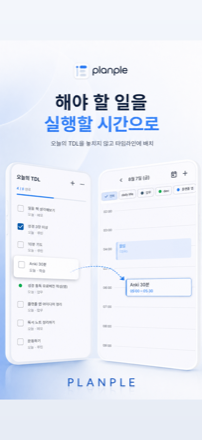
쪼갠 할 일은 바로 아래 24시간 타임라인에 앉습니다. 계획하는 화면과 실행하는 화면이 따로 있지 않습니다. What you break down lands on the 24-hour timeline right below it. There is no separate screen for planning and doing.
- 가입 없음No sign-up
- 광고 없음No ads
- 추적 없음No tracking
- 한국어 · 영어English · Korean
- iPhone · iPadiPhone · iPad
이렇게 생겼습니다Here’s what it looks like
App Store에 올라가 있는 화면 그대로입니다. 옆으로 넘겨 보세요. The same shots you’ll see on the App Store. Swipe sideways.

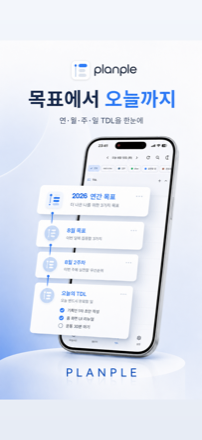
목표가 3일 만에 사라지는 건 의지 문제가 아닙니다 Goals don't die in three days because you lack willpower
“체력 만들기”는 목표지 오늘 할 일이 아닙니다. 오늘 아침 7시까지 내려오지 않으면 하루는 그냥 흘러갑니다. “Get fit” is a goal, not a task for today. Unless it comes down to 7 a.m. this morning, the day just passes.
연간 목표는 메모장에, 오늘 할 일은 투두 앱에, 일정은 캘린더에. 따로 놀면 연말에 목표는 그대로입니다. 플랜플은 그 네 단계를 한 화면에서 아래로 내려오게 만들었습니다. Yearly goals in a notes app, today's tasks in a to-do app, events in a calendar. Kept apart, the goal is still untouched in December. Planple puts all four levels on one screen, descending.
쪼갭니다Break it down
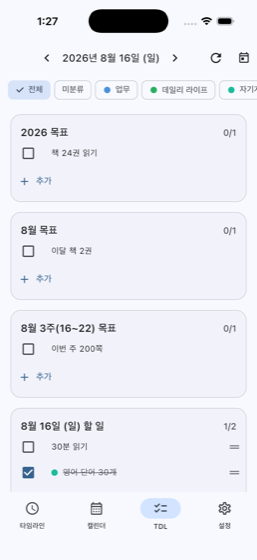
네 단계가 한 화면에 있습니다. 위 칸의 목표를 눌러 아래 단계로 내려보내면, 그게 곧 다음 기간의 할 일이 됩니다. All four levels live on one screen. Send a goal from the row above down to the next level, and it becomes that period's task.
- 복잡한 분류를 먼저 만들 필요가 없습니다. 일·삶·사이드는 필요할 때 칩 하나로 나눠 봅니다. No taxonomy to set up first. Split work, life, and side projects with a single chip when you need to.
- 월·주 캘린더로 흐름을 보고, 하루는 타임라인으로 자세히 Month and week for the shape of things, the timeline for the detail
- 못 끝낸 할 일은 다음 기간으로 넘길 수 있습니다 Didn't finish? Carry it to the next period
시간에 앉힙니다Put it on the clock
오늘 할 일 바로 아래가 24시간 타임라인입니다. 정한 할 일을 그 자리에서 원하는 시각에 씁니다. 앱을 옮겨 다니지 않습니다. The 24-hour timeline sits right below today's tasks. Write what you decided straight onto the hour you want — no app-hopping.
- 자정을 넘는 일정도 그대로 (23:00 – 01:00) Events that cross midnight work as-is (23:00 – 01:00)
- 여러 날에 걸친 일정은 걸쳐 있는 모든 날짜에 띠로 보입니다 Multi-day events show as a band on every day they span
- 홈·잠금 화면 위젯 세 종류 — 앱을 열지 않아도 오늘이 보입니다 Three Home and Lock Screen widgets — today without opening the app
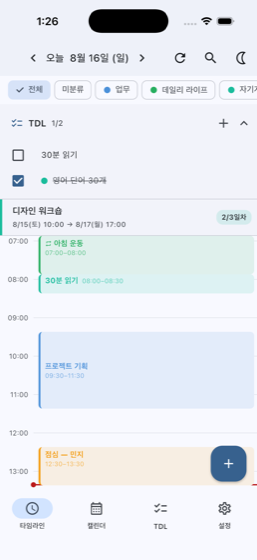
알람은 한 번으로 안 됩니다One alarm is never enough
알람 하나는 그냥 끄게 됩니다. 그래서 한 일정에 여러 개를 붙일 수 있게 했습니다 — 1시간 전, 10분 전, 정각. A single alarm just gets dismissed. So you can attach as many as you want to one event — an hour before, ten minutes before, right at the start.
- 앱을 완전히 종료해 둬도 정확한 시각에 울립니다 They fire even with the app fully closed
- 기기를 재부팅해도 예약이 남습니다 Reboot the device and the schedule survives
- 여행이나 서머타임으로 시간대가 바뀌어도 어긋나지 않습니다 Travel or daylight saving won't shift them off
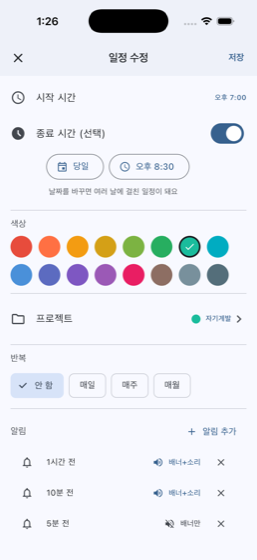
계획은 어차피 밀립니다Plans slip. That's fine.
일정 하나를 눌러 뒤로 밀면 남은 하루가 알람까지 통째로 이동합니다. 하루를 버리는 게 아니라 미루는 것뿐이라 그날이 무너지지 않습니다. Push one event back and the rest of the day moves with it, alarms included. You're postponing the day, not throwing it away — so it doesn't collapse.
- 10분 · 30분 · 1시간, 아니면 직접 입력 10 minutes, 30, an hour — or type your own
- 잘못 밀었으면 바로 되돌릴 수 있습니다 Pushed the wrong one? Undo it right away
- 반복 일정은 건드리지 않습니다 — 시리즈 전체가 밀리는 사고를 막습니다 Repeating events are left alone, so a whole series can't slide by accident
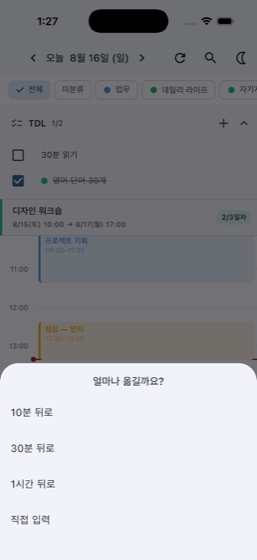
한 발 물러서서 보기Step back and look
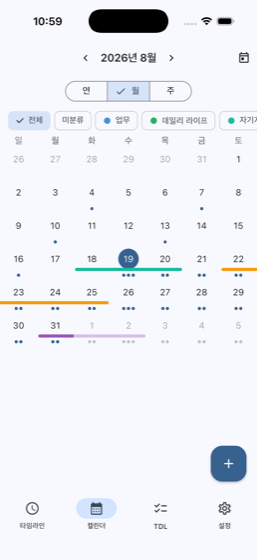
하루만 들여다보면 흐름이 안 보입니다. 달·주·연 단위로 넓혀 보고, 다시 하루로 좁혀 들어옵니다. Staring at one day hides the shape of things. Widen out to a month, a week, a year — then come back to today.
- 월 · 주 · 연간 세 가지 보기 Month, week and year views
- 넓은 화면에서는 달력 옆에 그날 하루가 같이 보입니다 On wide screens a day's schedule sits right beside the calendar
- 여러 날에 걸친 일정은 걸쳐 있는 모든 날짜에 표시됩니다 Multi-day events appear on every day they span
같이 세워야 하는 계획도 있죠 Some plans you make with someone 프로PRO
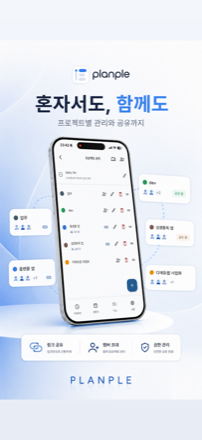
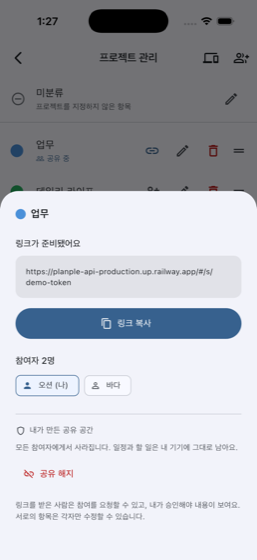
프로젝트를 링크로 초대하면 그 프로젝트의 일정과 할 일을 함께 봅니다. 회원가입은 없습니다. Invite someone to a project by link and share its events and to-dos. There's no sign-up.
- 항목마다 누가 썼는지 보이고, 고치고 지우는 건 각자 자기 것만 Every item shows its author, and each person edits only their own
- 링크를 받아도 방장이 승인해야 들어올 수 있습니다 Having the link isn't enough — the owner has to approve you
- 공유를 시작하는 건 프로, 초대받아 참여하는 건 무료 Starting a share needs Pro; joining by invite is free
있으면 편한 것들The rest of it
눈에 띄지 않지만, 없으면 아쉬운 것들입니다. 여기 있는 여섯 가지도 무료입니다. Quiet things you’d miss if they weren’t there. These six are free too.
하루 리뷰Daily review
저녁에 그날을 되돌아보고, 이어온 날을 셉니다.Look back on the day and count the streak you’ve kept.
검색Search
일정과 할 일을 한 번에 찾습니다.Find events and to-dos in one place.
반복 일정Repeating events
매일·매주·매월. 자정을 넘는 일정도 그대로.Daily, weekly, monthly — and past midnight, as-is.
다크 모드Dark mode
기기 설정을 따릅니다. 따로 켤 것이 없습니다.Follows your device. Nothing to switch on.
프로젝트 칩Project chips
일·삶·사이드를 한 번 눌러 가릅니다.Split work, life and side projects with one tap.
사용설명서User guide
설정 안에 있습니다. 하루가 굴러가는 순서대로.Inside Settings, ordered the way a day actually runs.
일정도 알람도 기기 안에만 있습니다 Your events and alarms stay on your phone
플랜플은 가입이 없습니다. 계정도, 이메일도 받지 않습니다. 공유를 직접 켜지 않으면 서버로 나가는 요청이 한 건도 없습니다. 광고도 추적도 없습니다. Planple has no sign-up. No account, no email address. Unless you turn sharing on yourself, not a single request leaves your device. No ads, no tracking.
공유를 켜면 그 프로젝트의 항목만 올라갑니다. 다른 프로젝트, 하루 리뷰, 설정값은 서버가 모릅니다. 알람은 개인적인 것이라 공유 항목이어도 각자 기기에만 남습니다. Turn sharing on and only that project's items go up. Other projects, your daily reviews, and settings are unknown to the server. Alarms are personal, so even on shared items they stay on each device.
거의 다 무료입니다Nearly all of it is free
목표를 쪼개고, 타임라인에 앉히고, 알람을 여러 개 붙이고, 위젯을 쓰는 것 — 여기까지 다 무료입니다. Breaking down goals, the timeline, multiple alarms, the widgets — all free.
플랜플Planple
- 연·월·주·오늘 목표와 할 일Year, month, week, and today
- 24시간 타임라인 · 캘린더24-hour timeline · calendar
- 일정별 다중 알람Multiple alarms per event
- 위젯 · 하루 리뷰 · 일괄 밀기Widgets · daily review · bulk shift
플랜플 프로Planple Pro
- 프로젝트 공유 시작 Start sharing a project
- 초대받아 참여하는 건 프로가 아니어도 됩니다 Joining by invite doesn't need Pro
직접 만들고 있습니다Made by one person
불편한 점이나 필요한 기능이 있으면 편하게 알려주세요. 제가 직접 읽고 고칩니다. If something's awkward or missing, just tell me. I read it myself and fix it.
올해 목표를 오늘 할 일로 바꿔 보세요 Turn this year's goal into today's task
여기까지 오면 실행이 시작됩니다. That's where doing actually starts.